
History
Undo and redo
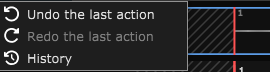
When a session is open, the menu bar has a History menu, right after Export. It has three entries:
- Undo the last action (Ctrl + Z);
- Redo the last action (Ctrl + Y);
- History, which opens the full list of actions.
The first two are greyed out when there is nothing to undo or redo. They act on the screen you are on: in the multitrack view, on multitrack actions; in a block editor, on that block's changes.
A block editor window opened separately has its own reduced menu bar, with the same three entries, acting on that block's history.
What can be undone, and where
The history is split in three, so a touch-up inside a block doesn't get mixed up with the structure of your song:
- The multitrack view: adding, adjusting and deleting tracks, the volume, equalizer and effects of the session, a track or a block, placing, moving, duplicating, cloning, merging and cropping blocks.
- A block's editor: waveform edits, midi notes, a drum block's instruments, the parts generated by artificial intelligence and applied to the block, renaming the block.
- An external audio file opened from File › Open an audio file, with its own stack.
The history is kept when you close the application: reopen the session, and you can still undo what you did before. To make that possible, the application keeps the original files on disk (takes, edited versions, deleted tracks and blocks). The Settings › Storage menu lets you choose what is kept - see the Disk space chapter.
The History window
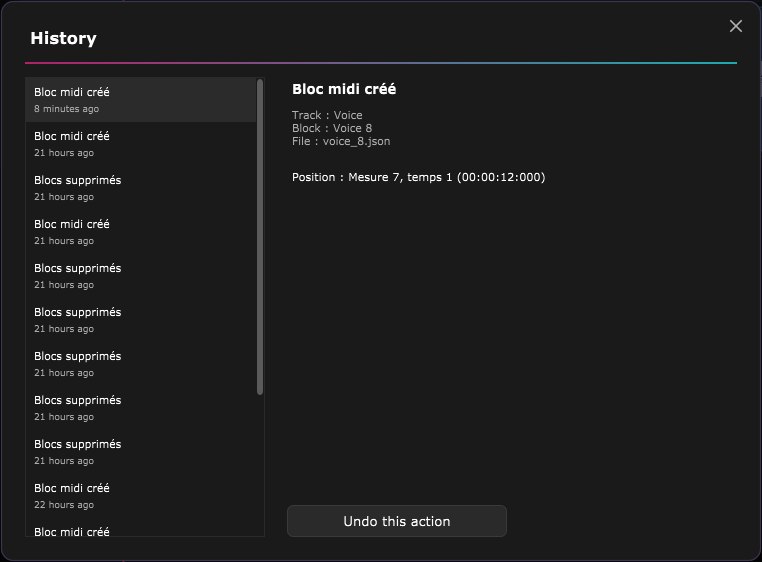
History › History opens the list of every action on the current screen, the most recent first; the list fills in as you scroll it.
- Click a row: the right panel details the action, with the before and after values for a setting (volume, effect, tempo, subdivision…).
- The purple Undo this action button undoes exactly that action, even if others followed it. It only appears if that is still possible right now (for instance if the file or effect concerned still exists).
Undoing an action from this window counts as a new action: the original entry stays in the list, and a new row appears at the top.
ASIO is a trademark of Steinberg Media Technologies GmbH, registered in Europe and other countries.